Deploy Contracts
The Deploy Contracts feature allows organizations to deploy their created contracts onto specific networks within a business group. This document explains how to deploy contracts, manage existing deployments, and view deployment details.
Overview
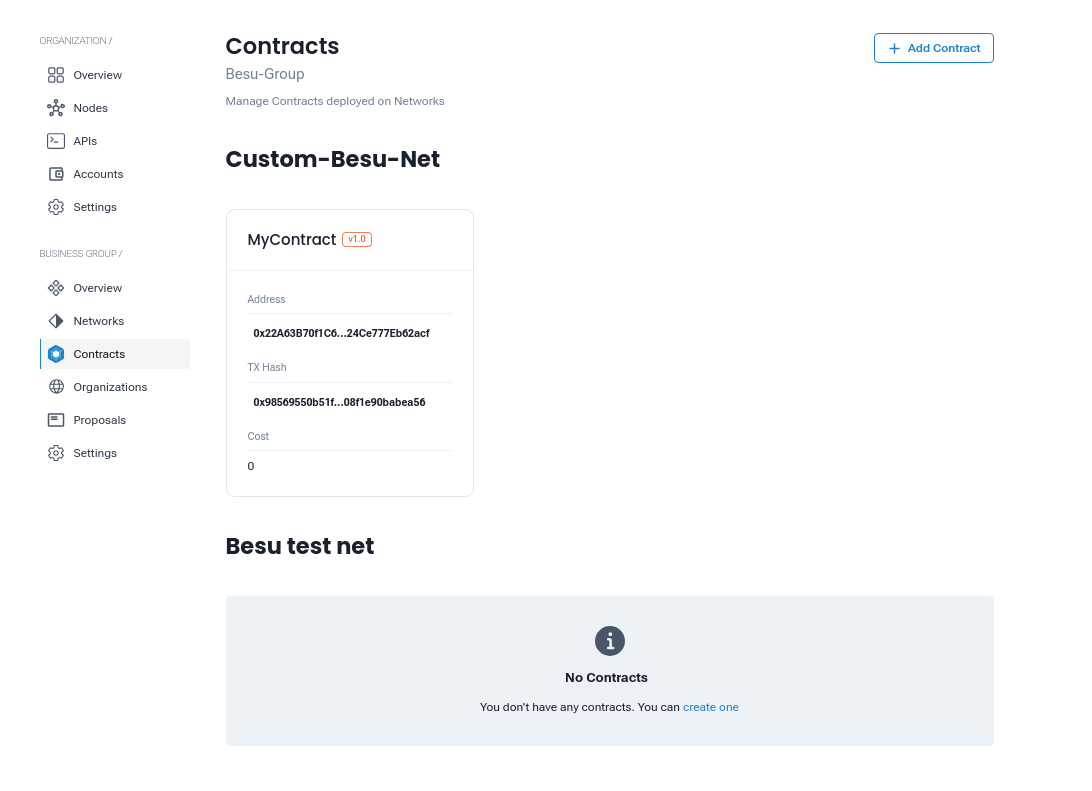
To deploy or manage contracts, navigate to the Contract Tab within your business group. This tab provides a comprehensive view of all network contracts, including details about previously deployed contracts. For example:
Adding a Contract to a Network
To deploy a new contract, click the + Add Contract button. This will navigate you to the Add Contract screen, where you will provide the necessary information.
Add Contract
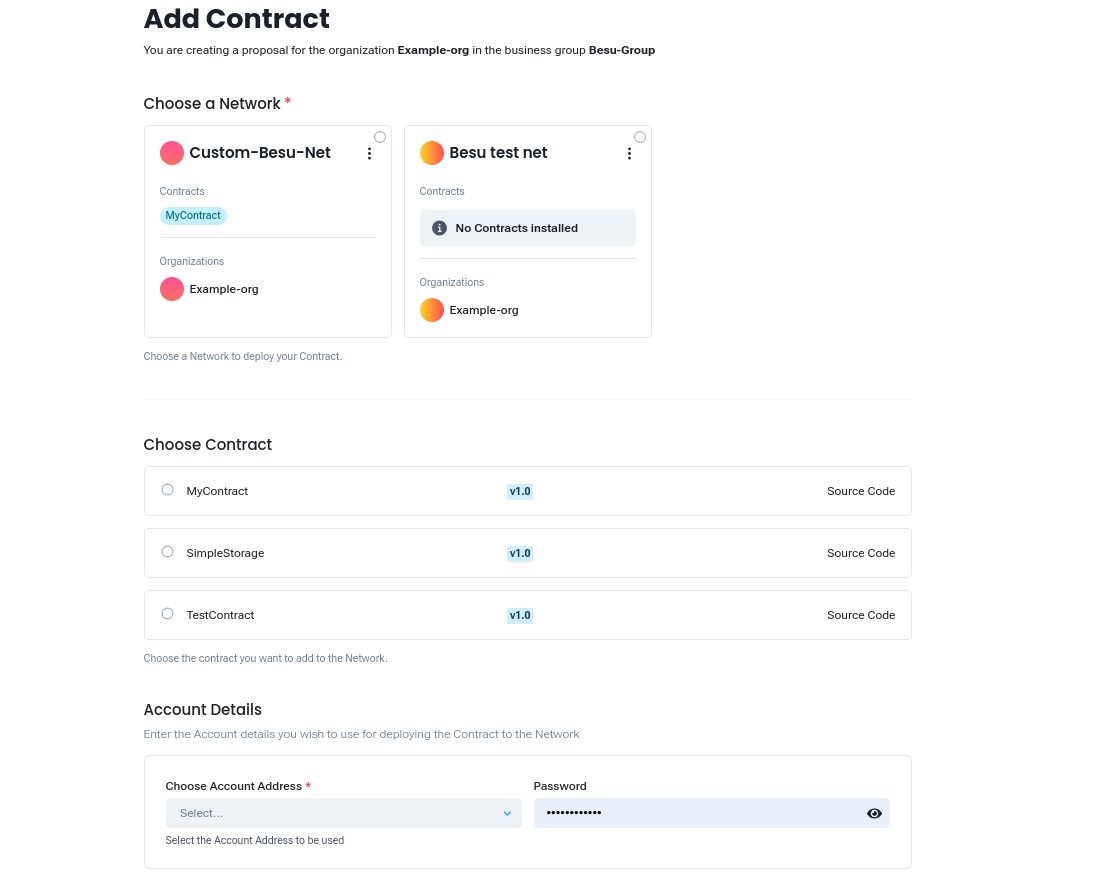
Proposal Details
When creating a proposal for deploying a contract, the following details are displayed:
- Organization
- Business Group
Required Information
1. Choose a Network
- Select the target network for the deployment (e.g.,
Custom-Besu-Net,Besu test net). - Networks without installed contracts will display "No Contracts installed."
2. Choose Contract
From the list of available contracts, select the contract to deploy:
3. Account Details
- Account Address*: Choose the account address to use for deployment.
- Password*: Provide the password for the account to authenticate the deployment.
Submission and Deployment
After completing the required fields, submit the proposal. Once submitted:
- The contract will be added to the business group (e.g., Besu-Group) upon approval.
- The deployment process may take some time.
- After deployment, the contract details will be visible in the Contract Overview tab.
Post-Deployment Management
After successful deployment, you can view and manage the contract details, including:
- Status: Monitor the deployment status.
- Address: The Ethereum address of the deployed contract.
- Transaction Hash (TX Hash): A unique identifier for the deployment transaction.
- Network Details: Verify the network the contract is deployed to.
Benefits of Deploying Contracts
- Network Integration: Easily integrate your contracts into desired blockchain networks.
- Flexibility: Deploy contracts created via upload or the builder feature.
- Transparency: Track the deployment status, transaction hash, and network details.
- Scalability: Support for multiple networks and contracts within business groups.
Recommended next steps:
- Invite an Organization: Learn how to invite other organizations to your Business Group in the GoBesu Organization Guide.
- Create an API: Expose your deployed contract's methods as REST endpoints with GoBesu API.
- Manage Accounts: Create and manage Ethereum accounts used to sign transactions in GoBesu Accounts.
Troubleshooting
"No contracts available" when adding a contract to a network Ensure you have already created a smart contract in the GoBesu Smart Contract guide. Contracts must be created (uploaded or built) before they can be deployed.
Deployment proposal is not progressing Check that all required organizations in the Business Group have accepted the deployment proposal. Navigate to the Business Group dashboard and review the Proposals tab.
Account authentication fails during deployment Verify the account address and password are correct. Accounts are managed in the GoBesu Accounts section of your organization. The account must exist on the network before it can be used for deployment.
Deployed contract shows no address or TX Hash The deployment transaction may still be processing. Allow a few moments and refresh the Contract Overview tab. If it remains stuck, check node connectivity and validator status in your network.